Product Overview · October 2026

What E-Kolay İş does today, who it is for and what it does not do yet, shown with real screens. Share it with your team or your accountant.

On a phone the PDF reads best: download it and zoom in.

Product OverviewOctober 2026

Cloud bookkeeping, invoicing and inventory

From invoice to report, your day-to-day business in one record.

E-Kolay İş is browser-based business software that runs your customer and supplier accounts, cash and bank, sales and purchase invoices, inventory and reporting on a single database. This overview goes beyond our website: it explains what the product does today, who it is for, which problems it solves — and what it does not do yet — using real screens.
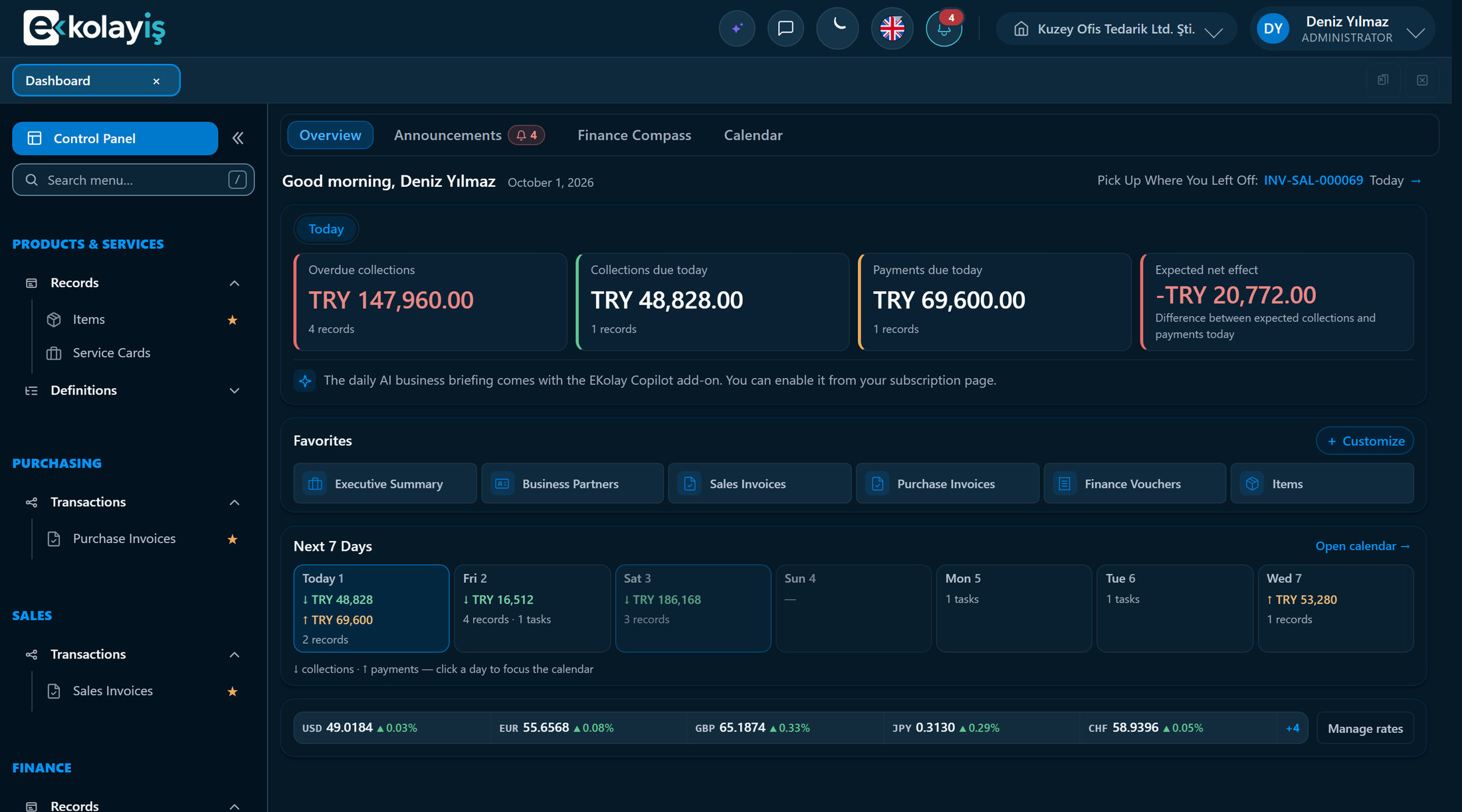
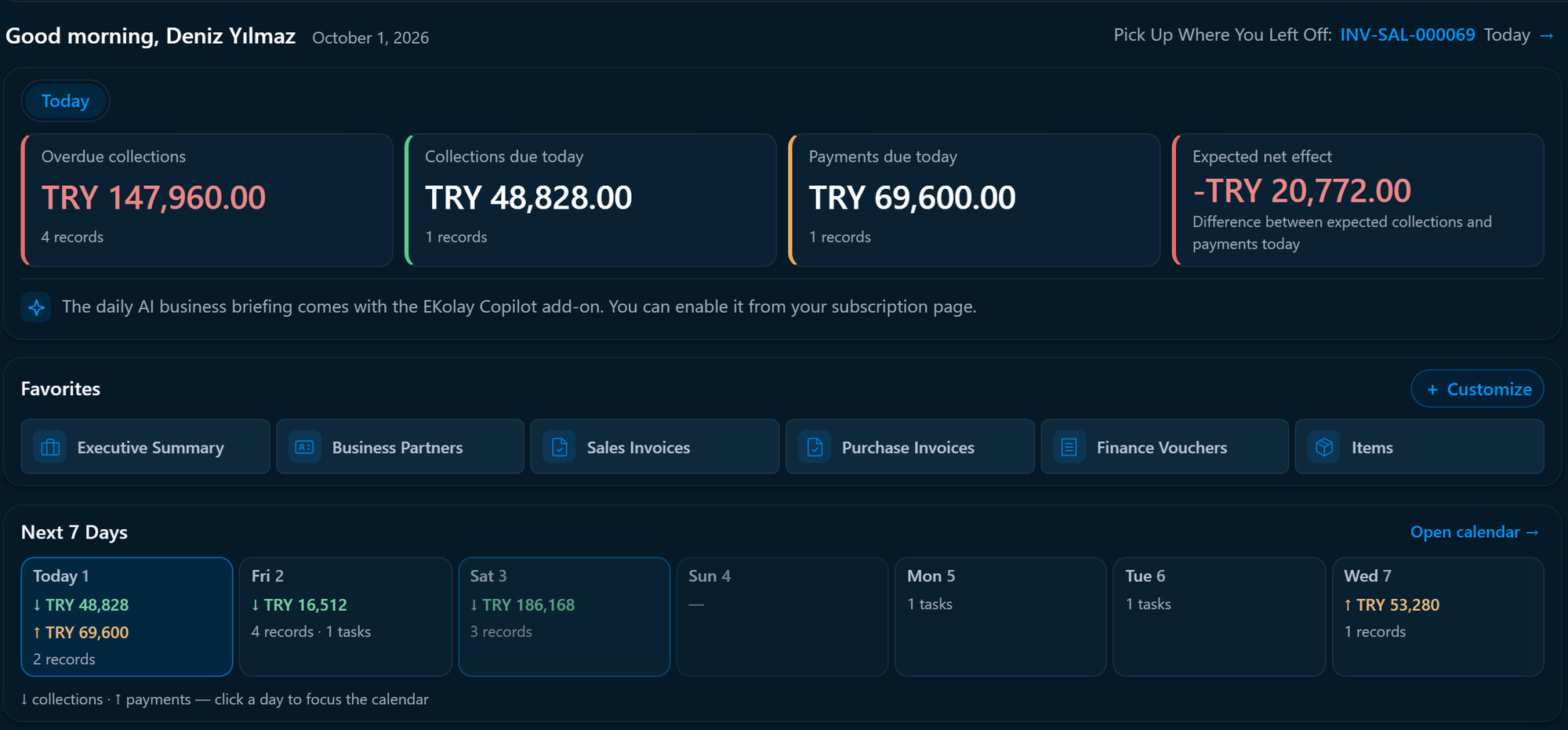
E-Kolay İş Dashboard: overdue collections, today’s collections and payments, the next 7 days and exchange rates
Dashboard: overdue collections, today’s collections and payments, the next 7 days and current exchange rates on one screen.
Setup
None — runs in the browser, installs on phones like an app
Interface
Turkish and English; each user picks their own
Currencies
Local and foreign currency side by side; Turkish central-bank rates nightly
Trial
30 days free; no credit card
www.ekolayis.comScreens are taken from the live product, using sample data from a fictitious company.Page 1 / 10

E-Kolay İş Product Overview

01 · Who it is forOctober 2026

Who it is for

For businesses that invoice, collect and keep stock.

E-Kolay İş is offered in two plans today: Solo for one-person businesses, and Standard for companies working with a team, inventory and credit terms. A sales pipeline, retail checkout and repair work are covered by add-ons.

Problems it solves

Scattered work, brought into one record.

In most small businesses todayWith E-Kolay İş
Sales in one spreadsheet, payments in the bank statement, stock in another file — and the numbers never agree at month end.An invoice is entered once. When it is posted, the account balance, the VAT entry and (on Standard) the stock quantity are created from that same document, and every report reads the same records.
Overdue customers are discovered at month end, by looking manually.On Standard, the Dashboard shows overdue collections, today’s expected collections and payments, and the next 7 days every morning; payments are matched to invoices, so each invoice shows whether it is open, partly paid or settled.
Foreign-currency sales and purchases get mixed into local-currency records; rates are looked up by hand.Documents, accounts, cash desks and bank accounts each keep their own currency. Central-bank rates arrive automatically every night, and a document’s rate is fixed when it is saved.
Preparing spreadsheets for the accountant takes days every month.Account Balance, VAT Book, Income & Expense and statements export to Excel, PDF or CSV in one click, each file stamped with the company, author, time and filters used.
“Who changed this amount, and when?” has no answer.Record History keeps every insert, change and deletion with who, when and from which IP — field by field, old and new value. The trail cannot be altered afterwards.
The owner’s summary is pieced together from several reports.The Executive Summary puts net sales, receivables and payables, overdue invoices, upcoming payments and cash + bank on one page, compared with the previous period and last year (due-date sections on Standard).
Finding one figure means clicking through screen after screen.Ask EKolay Assistant: “Who owes us the most?” The answer comes from your reports, with a link that opens the report it used.
www.ekolayis.comScreens are taken from the live product, using sample data from a fictitious company.Page 2 / 10

E-Kolay İş Product Overview

03 · Scope: what is included todayOctober 2026

Scope

What is included today — module by module.

Every item on this page works in the plans on sale today. Features that are not here yet are listed under “Straight talk” on page 9.

Business partners

  • Customers, suppliers or both; individuals, companies or foreign parties.
  • Turkish tax-ID (VKN/TCKN) checksum checks; IBANs are validated and the bank is recognised from the IBAN.
  • Each account keeps its own currency; contact person, address and attachments on the card.
  • Account Statement: brought-forward balance, every movement with its document, running balance.

Invoices

  • Simple Invoice: record sales, purchases and returns by VAT-rate lines; posting updates the account and the VAT report.
  • Sales and purchase invoices: item and service lines, warehouse, line discount, VAT and withholding codes, instalment plans.
  • Return invoices link to the original; returns cannot exceed the quantity sold.
  • Paste lines from Excel; PDF output through an editable document template.
  • Approved invoices are locked; changes go back to draft through “Revoke approval”.
  • Number series: prefix, suffix and padding are yours to choose.

Cash, bank and finance vouchers

  • Cash desks and bank accounts, each in its own currency; credit cards, loans and overdrafts tracked apart, loan instalments paid in one step.
  • Eight voucher types in three menus: Receipts and Payments, Income and Expenses, Transfers and Adjustments; printable receipts.
  • Income and expense categories (rent, utilities, salaries…) are yours to edit; a new line starts with General.
  • Posted vouchers never change; “Correct” voids the original and posts the right one in a single step.
  • Employee cards: advances, salaries and expenses tracked with vouchers.
  • Match collections and payments to invoices; payment status per invoice.
  • Cheques and notes: portfolio, collection, endorsement, bounced items.
  • Import bank statements from Excel or CSV; movements match automatically, with a month-end reconciliation summary.

Currencies

  • Invoices, accounts, cash desks and bank accounts in local or foreign currency; cross-currency transfers.
  • Turkish central-bank (TCMB) rates arrive automatically every night; rates can be overridden per document.
  • Document, account and company currencies are tracked separately; exchange differences are booked with an adjustment note.

Items, services and inventory

  • Item and service cards: barcode, category, brand, model, image, purchase and sales price, VAT.
  • Alternative units (1 box = 12 pcs); invoice in whichever unit you need.
  • Multiple warehouses; invoices move stock automatically and negative stock is blocked.
  • Costing method: weighted average, FIFO or last purchase price.
  • Stock Statement: receipts, issues, unit price and running balance.
  • Import item and service cards from Excel or CSV: template, automatic column matching, dry run.

Reports and your accountant

  • Account Balance, Voucher Listing, Income & Expense (accrual or cash basis), VAT Book.
  • Cash and Bank Position, Cash Flow, Account Ageing, Category Statement, Period-End FX Revaluation.
  • Account, bank, cash desk and employee statements; Executive Summary.
  • Projects on vouchers and invoices; Project Summary report.
  • Due and overdue invoices; ageing and collection performance in the Executive Summary.
  • Excel, PDF, CSV and print; saved views you can share with your team.
  • Accountant Export: the period’s journal, trial balance and account codes in one Excel or CSV file.
  • Payroll Entry: the payroll summary from your accountant posted as a single expense voucher.

Dashboard and EKolay Assistant

  • “Today” card: overdue collections, today’s collections and payments, expected net effect.
  • Next 7 days: collections and payments falling due, plus personal notes.
  • Favorite screens and a current exchange-rate strip.
  • EKolay Assistant: ask your reports in Turkish or English and get answers with their source; a monthly question allowance is included.

Users and administration

  • Four roles: Administrator, Manager, User and Read-only.
  • Per-screen permissions: view, create, edit, delete, approve, print, export.
  • Record History, active sessions, optional two-step verification.
  • Help Center (31 sections in Turkish and English), guided tour, in-app feedback.

Add-ons — details on page 7

  • CRM Solo and Standard
  • CRM AI Standard
  • Point of Sale (POS) Standard
  • Technical Service Standard
  • EKolay Copilot Standard

User, warehouse and monthly document limits and current prices are on our pricing page: ekolayis.com/en/pricing

www.ekolayis.comScreens are taken from the live product, using sample data from a fictitious company.Page 3 / 10

E-Kolay İş Product Overview

04 · The daily workflow, on real screensOctober 2026

Product tour

The daily workflow, on real screens.

Kuzey Ofis Tedarik distributes office and IT supplies from three warehouses and sells to corporate customers on credit terms. Let’s follow its daily work through E-Kolay İş in five steps.

01

Morning overview

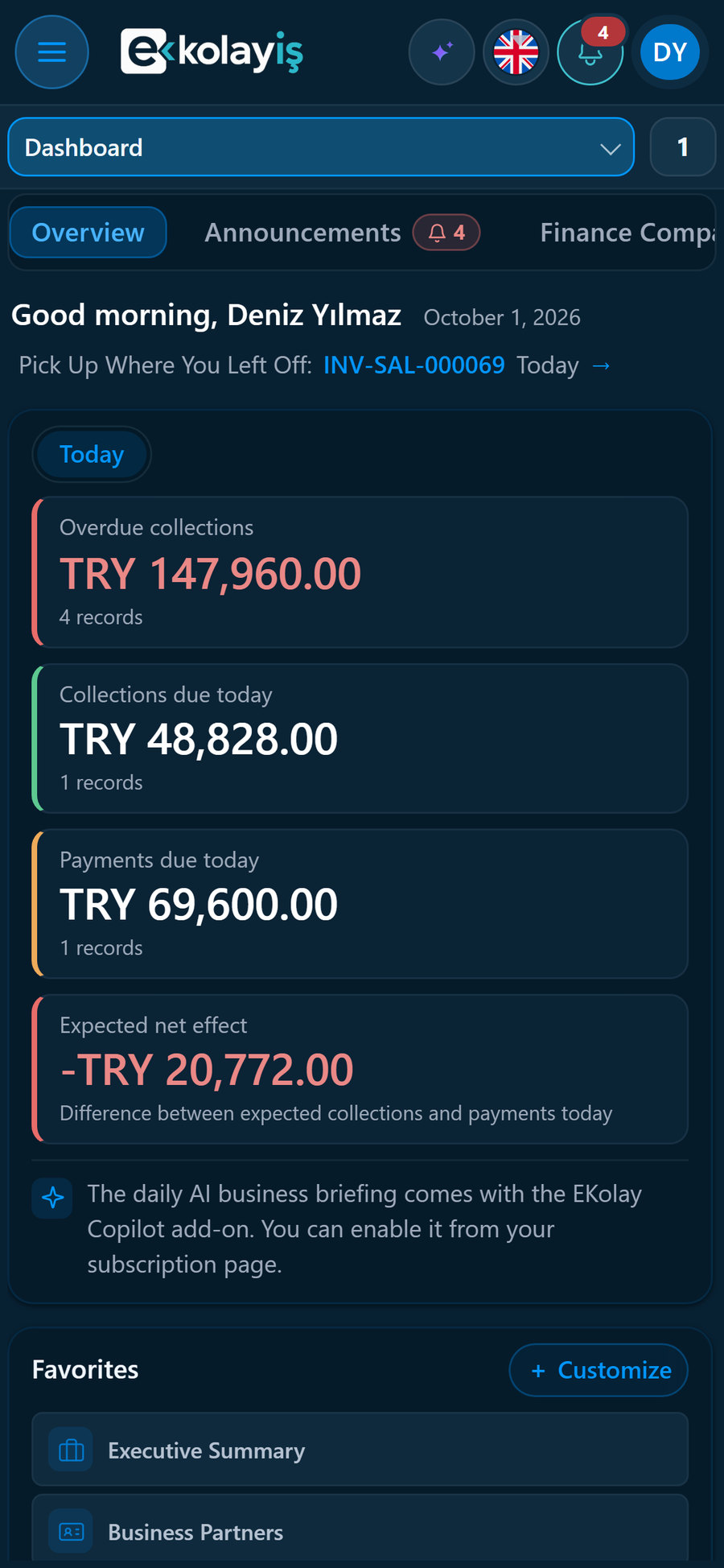
Deniz Yılmaz, the manager, starts on the Dashboard: four invoices are overdue, and TRY 48,828 in collections and TRY 69,600 in payments are due today. The next 7 days list the collections and payments falling due, day by day; clicking a day opens the calendar on it.

Dashboard: Today card, Favorites and Next 7 Days
  • Click a tile to list the invoices behind it.
  • Favorite screens open in one click; you choose the list.
  • The “Today” card shows open balances; a paid invoice drops off.
02

Sales invoice

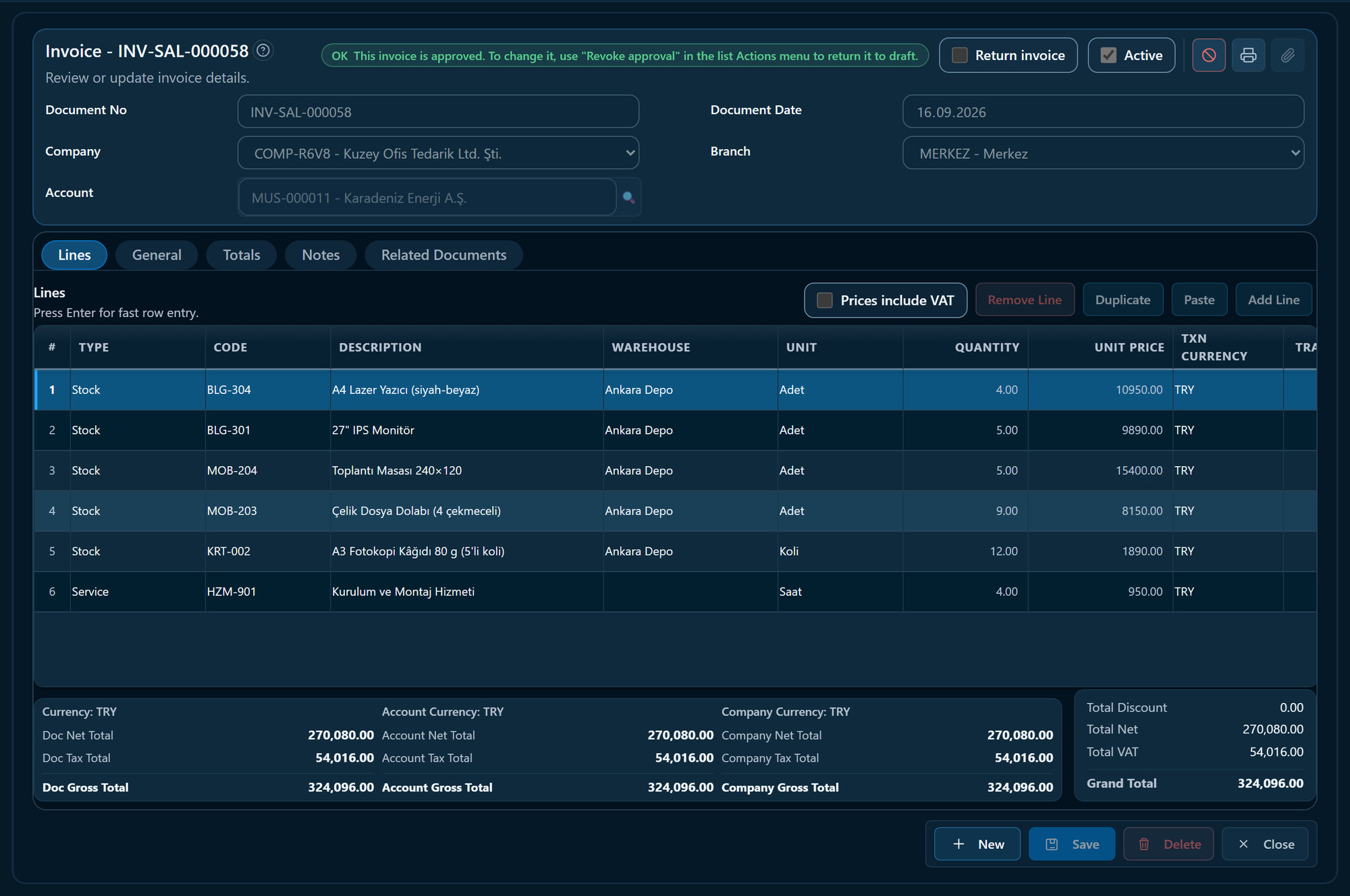
Sales invoice: item and service lines, Ankara warehouse, totals

Printers, monitors, furniture and an installation service are invoiced to Karadeniz Enerji’s Ankara office. Item lines are issued from the Ankara warehouse; the service line does not touch stock. Once approved, the invoice is locked and the account balance, stock and VAT entries are created together.

  1. Approved invoices are locked; changes go through “Revoke approval”.
  2. Warehouse per line — this sale ships from the Ankara warehouse.
  3. A service line on the same invoice; it does not touch stock.
  4. Totals shown in document, account and company currency.
www.ekolayis.comScreens are taken from the live product, using sample data from a fictitious company.Page 4 / 10

E-Kolay İş Product Overview

04 · The daily workflow, on real screensOctober 2026

03

Collection

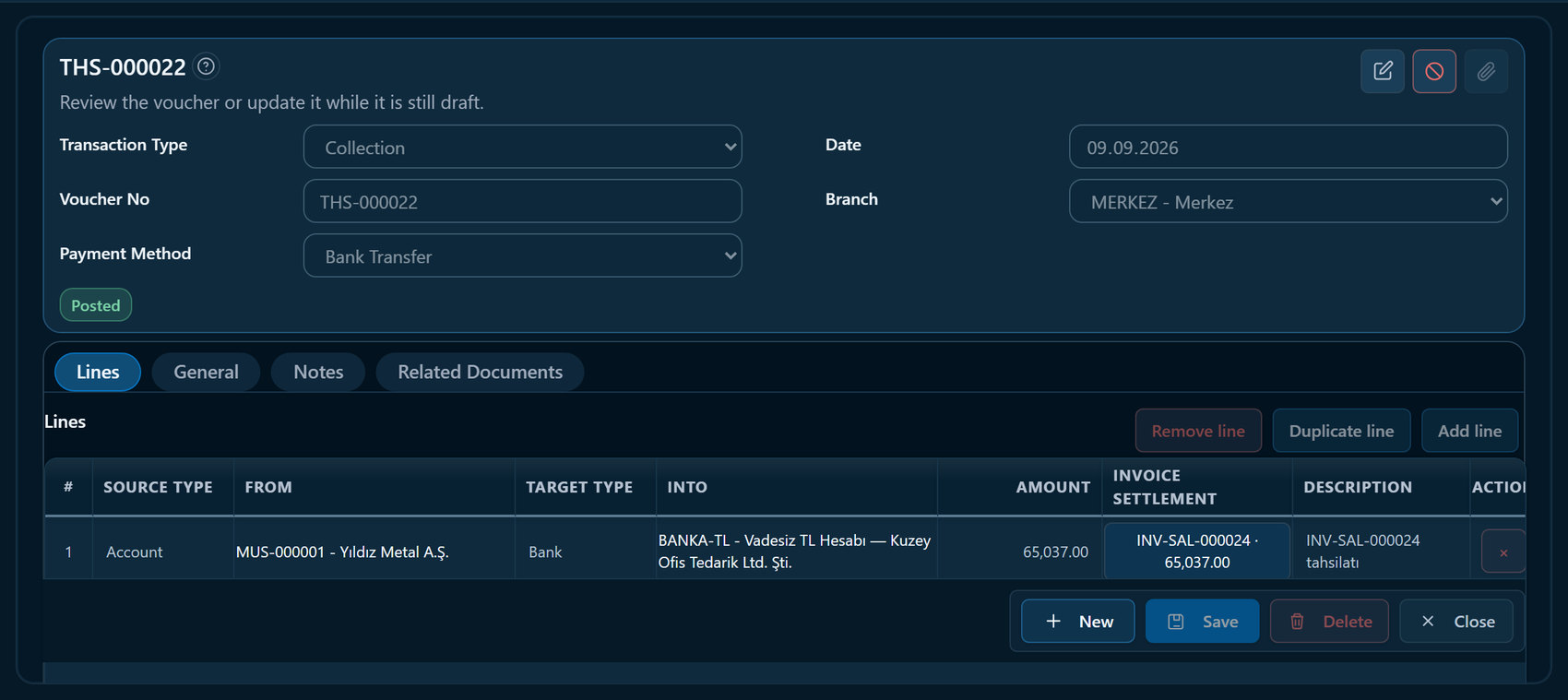
A bank transfer from Yıldız Metal arrives. The “Invoice Settlement” column on the collection voucher shows which invoice the payment closes; the invoice is settled and the account balance and Dashboard update at once.

Collection voucher: business partner, bank account and invoice settlement column
04

Account statement

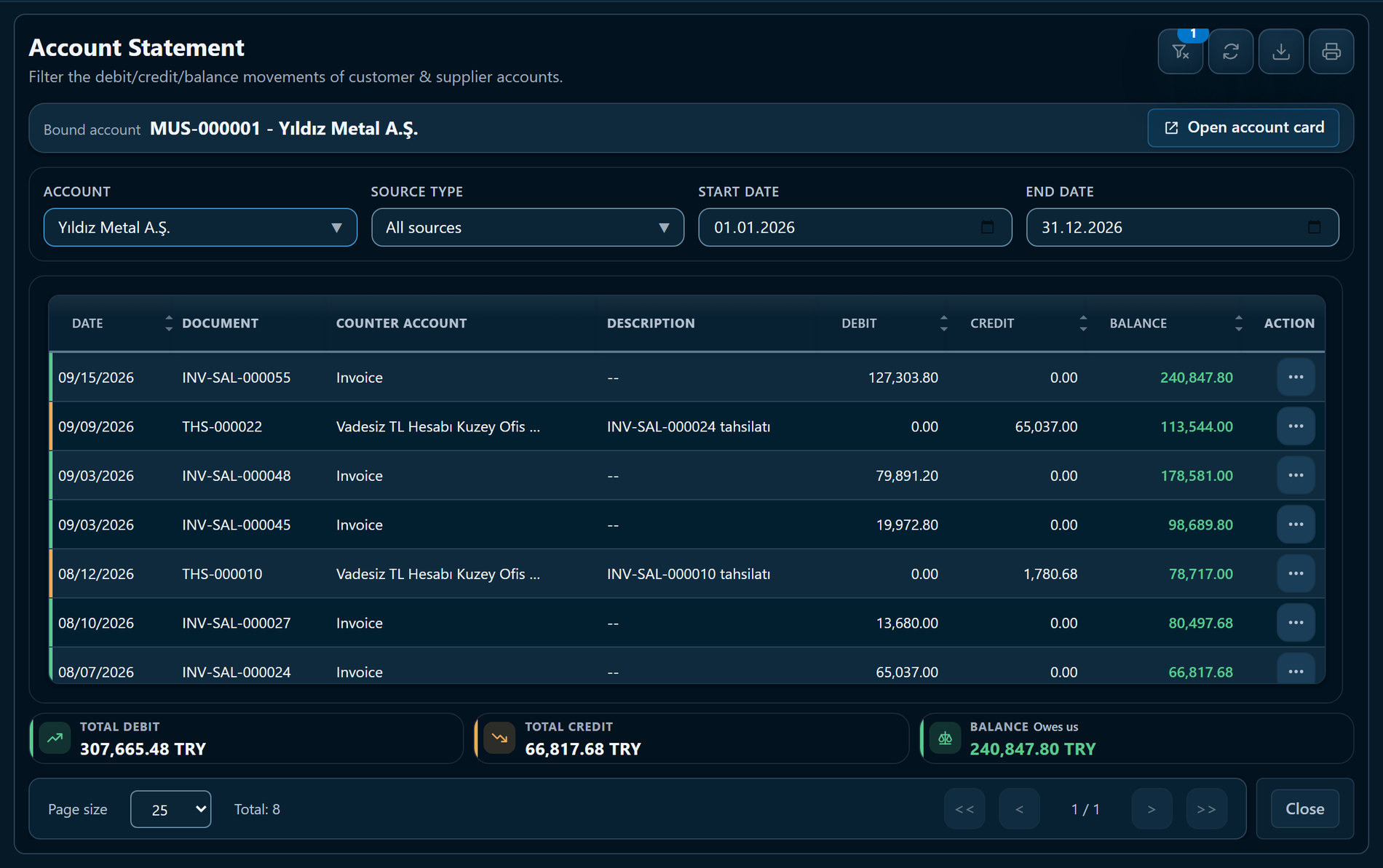
Yıldız Metal asks for a reconciliation. The Account Statement lists every invoice and payment with its document number and running balance, and exports to PDF or Excel in one click.

Account Statement: Yıldız Metal A.Ş. movements and running balance
05

Inventory

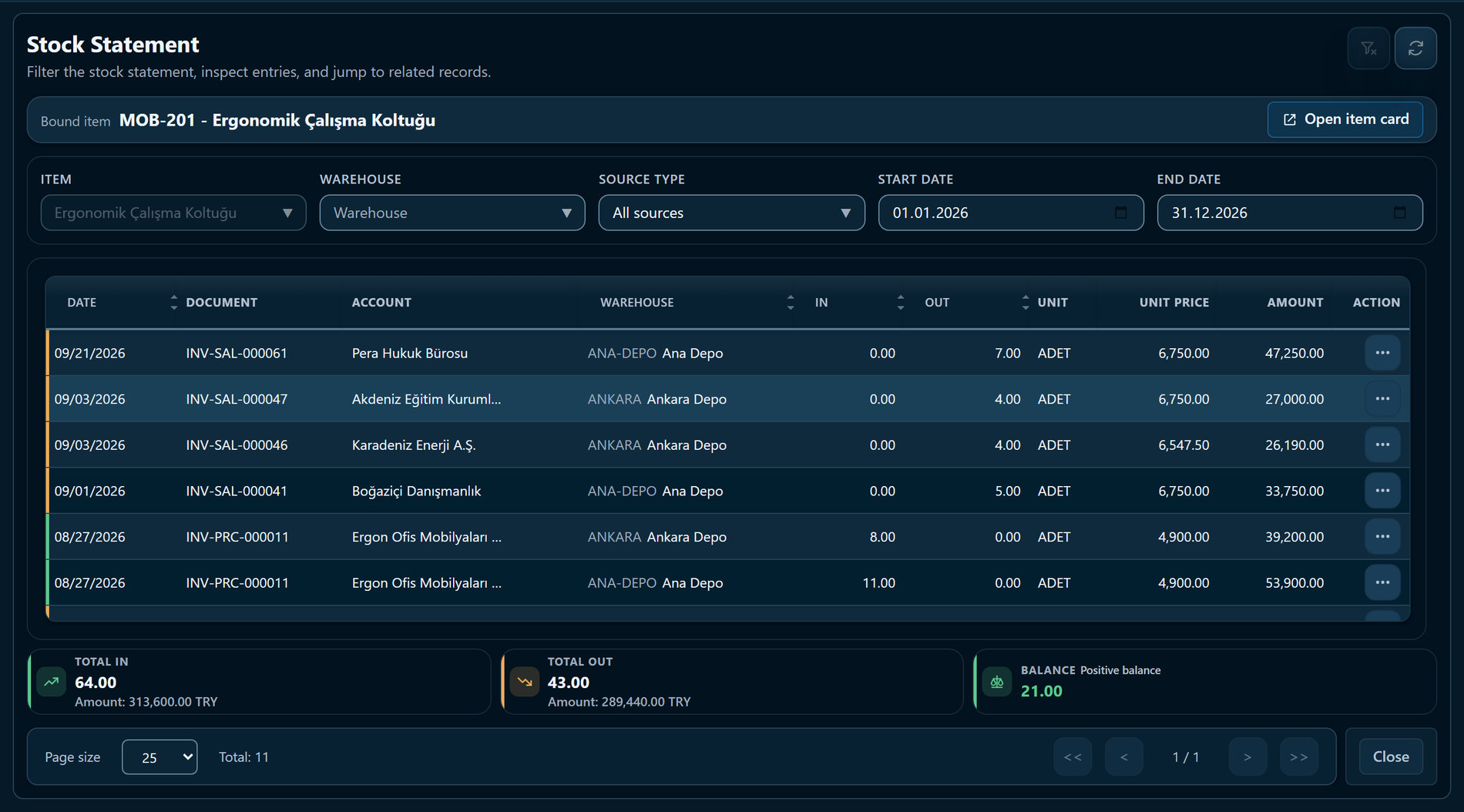
Every movement of an item: which invoice moved how many units in or out of which warehouse, at what unit price. The balance is recalculated with every movement.

Stock Statement: receipts, issues, unit price and balance by warehouse
www.ekolayis.comScreens are taken from the live product, using sample data from a fictitious company.Page 5 / 10

E-Kolay İş Product Overview

05 · Reports and EKolay AssistantOctober 2026

Reports and EKolay Assistant

One source for every figure — and you can simply ask.

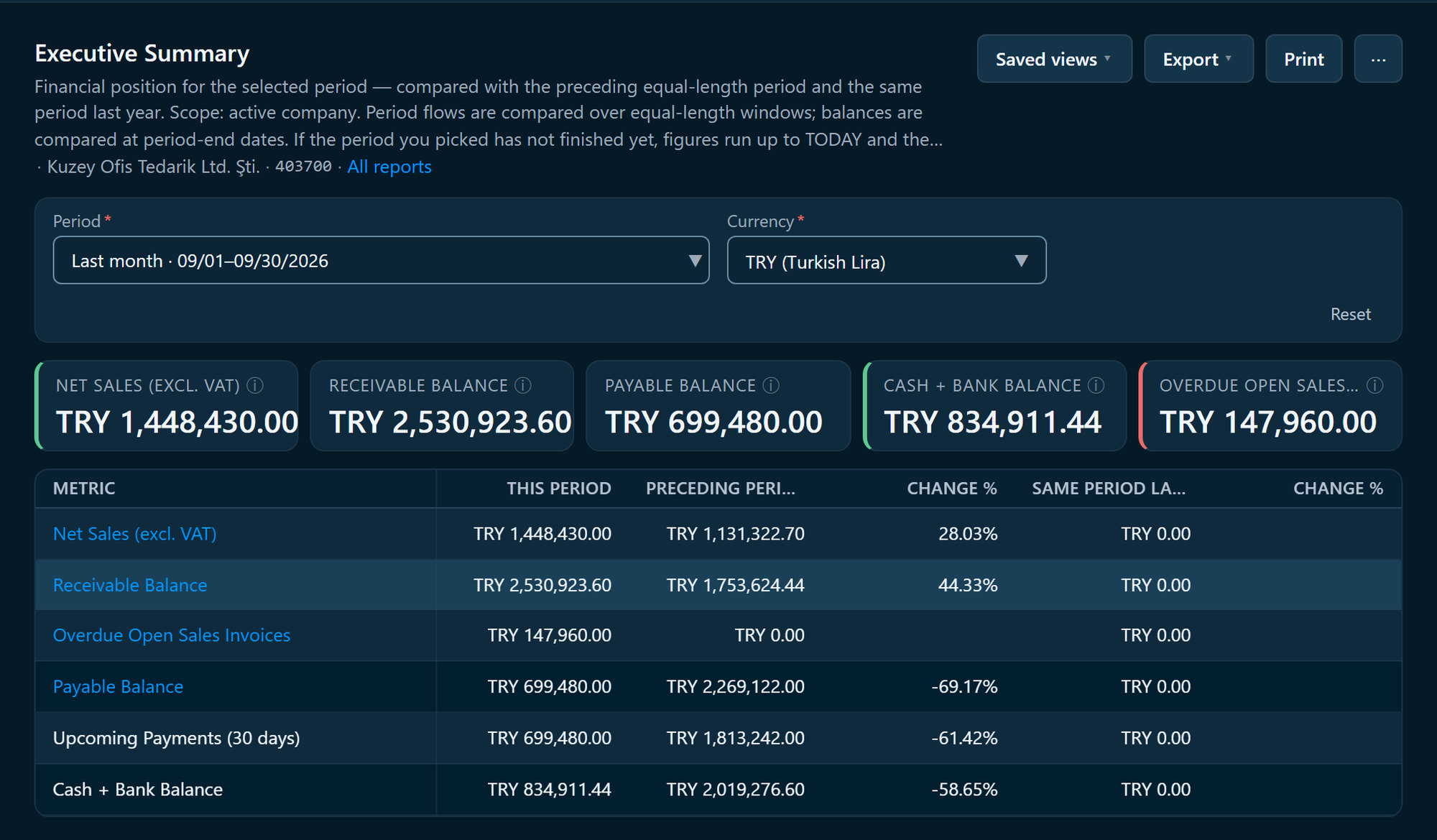
Executive Summary: September metrics compared with the previous period and last year

Executive Summary

A summary of the period you choose, compared with the previous period of equal length and the same period last year. In the example, September: net sales TRY 1.45 million, up 28% on August.

  • Net sales (excl. VAT), receivables, payables, cash + bank
  • Overdue invoices and payments due in the next 30 days
  • 12-month sales trend and receivables ageing
  • Top 5 riskiest accounts and average collection time
  • A 90-day cash view built from recorded due dates

The report states plainly that net sales are not profit. Due-date sections fill in on Standard.

Other reports

Account Balance
Debit, credit and balance for every account; “owed to us / we owe” summary.
Income & Expense
Monthly income, expense and net; accrual or cash basis.
VAT Book
Sales and purchase VAT by rate, returns included; net VAT.
Voucher Listing
Finance vouchers and simple invoices, with subtotals by type and currency.
Statements
Accounts, bank, cash desk and employees; brought-forward and running balance.
Cash Flow
Money in and out of cash desks and banks; net flow period by period.
Account Ageing
Open receivables and payables in day buckets by due date.
Due / Overdue Invoices
Due today, overdue and upcoming, with open amounts.

Every report: 15 preset periods, filters, saved views you can share with your team; export to Excel, PDF and CSV, and print. Each file is stamped with the company, author, time and filters.

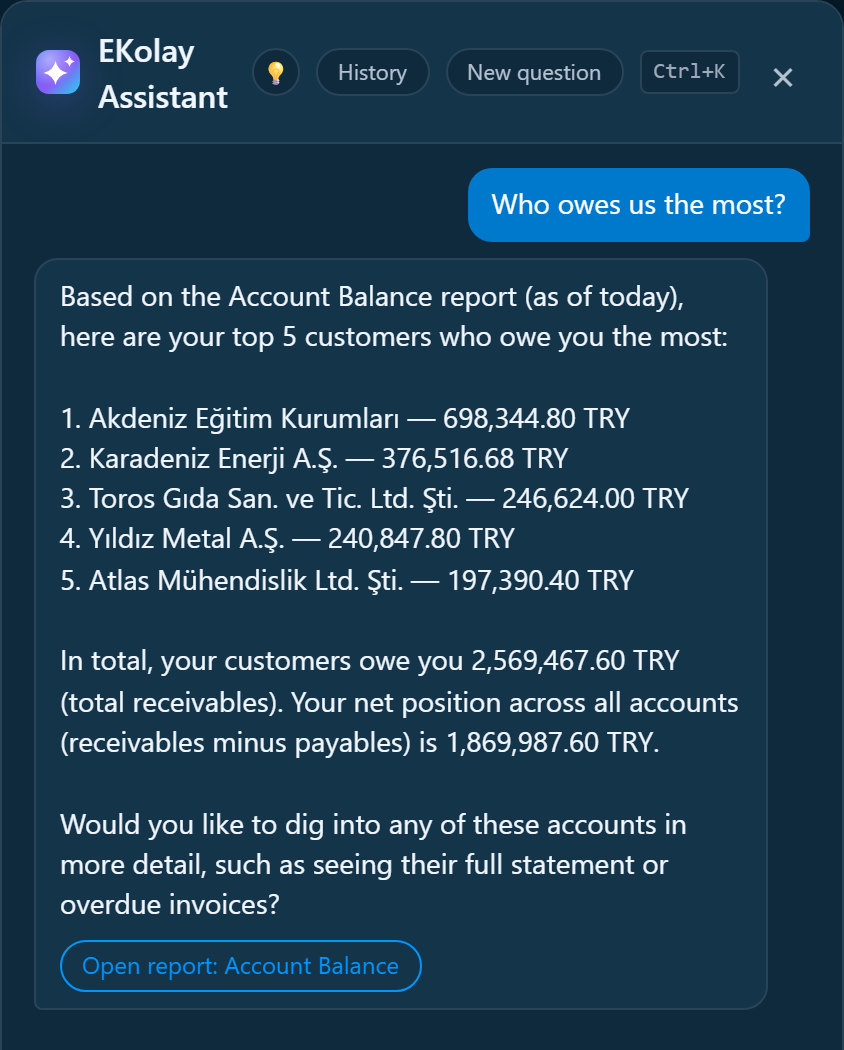
EKolay Assistant answering “Who owes us the most?” from the Account Balance report

EKolay Assistant

Type your question in your own words. The assistant runs a report you are allowed to see, answers with the figures and adds a link that opens that report with the same filters.

Read-only
It never creates, changes or deletes records.
Bound by your permissions
If you cannot see a report, neither can the assistant.
No invented figures
Answers come from report results, always with the source.
Aware of context
On an open invoice, ask “what is the status of this invoice?”.

To answer, the question and the relevant report rows are sent to our AI provider (Anthropic, USA); fields such as national ID numbers, IBANs and salaries are masked before sending. Within your company, only you can see your question history.

www.ekolayis.comScreens are taken from the live product, using sample data from a fictitious company.Page 6 / 10

E-Kolay İş Product Overview

06 · Add-ons and platformOctober 2026

Add-ons

Grow into new needs — on the same records.

Add-ons are not separate programs; they write to the same database. A POS sale updates stock and cash, a service order becomes an invoice, a CRM opportunity sees the account balance. Our team activates add-ons on your plan.

Anywhere, in your language

Browser and phone
No installation. Add it to your phone like an app (PWA); screens rearrange for small displays.
Turkish and English
Each user picks a language; number and date formats follow it.
Currencies
TRY plus USD, EUR, GBP, CHF, JPY and more come ready to use.
Keyboard speed
Search the menu with “/”, Ctrl+S to save, Ctrl+K for the assistant; paste lines from Excel.
Dashboard on a phone: Today card
www.ekolayis.comScreens are taken from the live product, using sample data from a fictitious company.Page 7 / 10

E-Kolay İş Product Overview

07 · Security, data and accessOctober 2026

Security, data and access

Your data: separated, traceable and yours.

Security is not a setting added later; it is built into the database and the application.

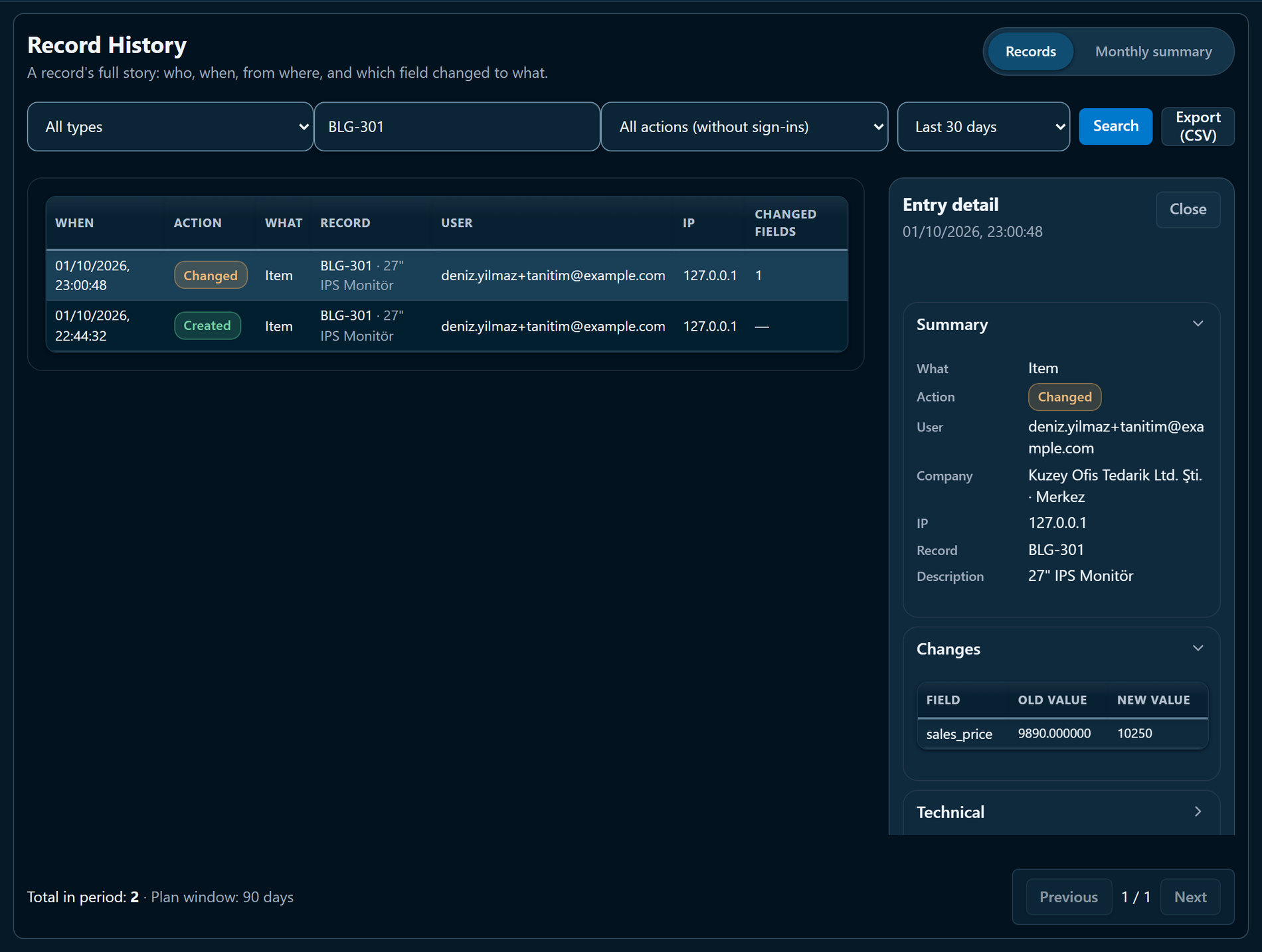
Record History: a sales-price change on an item card, old and new value
Record History: who changed the sales price on an item card, when and from which IP — old and new value.

In Record History

  • Who: the user’s name and email
  • When: date and time
  • Where from: IP address
  • What changed: old and new value, field by field
  • Filters: record type, code, action and period
  • Export: CSV; monthly summary as PDF, Excel or CSV
  • Visible to administrators only

Who holds your data, and for how long?

Hetzner Online GmbHGermany
Hosting of the platform and database, backups
AnthropicUSA
EKolay Assistant: questions and report results; national ID, IBAN and salary are masked

Retention periods

  • Activity (audit) records 24 months; financial and legal records 10 years
  • Assistant chat logs 90 days
  • Sign-in IP records 24 months

Full details in our Privacy Policy: ekolayis.com/en/gizlilik

www.ekolayis.comScreens are taken from the live product, using sample data from a fictitious company.Page 8 / 10

E-Kolay İş Product Overview

08 · Getting started, support and limitsOctober 2026

Getting started

What does day one look like?

  1. 01

    Create an account

    Name, email, company name and a password are enough; no credit card.

  2. 02

    Set up your company

    A two-step wizard: country, currency and branch, then Solo or Standard. Your 30-day trial starts right away.

  3. 03

    Bring your data

    Import item and service cards from an Excel/CSV template (Standard); enter business partners and opening balances.

  4. 04

    Add your team

    Create users, set roles and permissions, and give your accountant a read-only login.

Support and learning

Help Center
31 sections in Turkish and English; every screen opens its own help in one click.
Guided tour
A short tour on first sign-in — even shorter on phones.
Feedback Centre
Open a request with a screenshot from inside the app; you get a tracking code and a notification when we reply.
Email
info@ekolayis.com

Our suggested first 30 days

  1. Day 1Set up your account and company; learn the screens with the guided tour.
  2. Days 2–3Enter business partners and opening balances; import item and service cards from Excel (Standard).
  3. Week 1Record daily invoices and payments in E-Kolay İş; run your old process alongside for a while if you prefer.
  4. Week 2Give your accountant a read-only login; review the VAT Book and Income & Expense reports together.
  5. Week 4Review your first month in the Executive Summary; decide on your plan and add-ons.

Frequently asked

Where is my data stored?
The platform and database run in Hetzner Online GmbH data centres in Germany. All our service providers, including the AI provider the assistant uses, are listed in our Privacy Policy.
What happens when the trial ends?
The trial lasts 30 days, with no credit card. When it ends you keep full access for 7 more days; after that, access is paused and your data is kept.
How do I bring my existing data?
Item and service cards import from Excel or CSV templates (Standard). Business partners and opening balances are entered on screen and with an opening voucher today; Excel import for them is in development.
Is e-invoicing supported?
For Türkiye, the e-Invoice and e-Archive integration is built and in testing; once live, documents will be sent from inside the platform. E-invoicing for other countries is not available yet.
Does it integrate with other systems?
There are no ready-made bank, marketplace or e-commerce integrations today; bank statements are imported from Excel or CSV files (Standard). An open API and integration ecosystem are on our roadmap.

Straight talk

Decide with the full picture. Here is what we do not offer today:

Coming with higher plans

  • Quote → order → delivery note chain
  • Multiple companies and branches
  • Smart Alerts (anomaly and risk analysis)
  • One-click export of all company data; custom fields

In development

  • e-Invoice and e-Archive for Türkiye — in testing
  • Smart Document Reading — after the data-protection (KVKK) review
  • Excel import for business partners and opening balances
  • Opening stock and stock-count vouchers

Not available today

  • Bank feeds: statements do not arrive automatically; you import a file
  • Payroll calculation
  • Sending documents by email
  • Marketplace and e-commerce integrations
  • Tax localisation beyond Türkiye; an app-store app (runs in the browser and as a PWA)

Out of scope

  • Statutory books (journal, ledger, e-Ledger) stay with your accountant; your records reach them through Accountant Export.
  • The POS add-on is not a fiscal cash register; its receipt is an information slip.
www.ekolayis.comScreens are taken from the live product, using sample data from a fictitious company.Page 9 / 10

E-Kolay İş Product Overview

09 · Which plan fits youOctober 2026

Choosing a plan

Solo or Standard?

Both plans run on the same platform and the same security layer; the difference is scope. When you move from Solo to Standard, your records stay exactly where they are.

ScopeSoloStandard
Business partners, cash desks, bank accounts and finance vouchers
Simple Invoice: sales and purchases recorded by VAT rate
Sales and purchase invoices, return invoices, PDF output
Item and service cards, multiple warehouses, costing
Due-date tracking; matching payments to invoices
Cheques and notes, bank reconciliation, payroll entry
Dashboard: “Today” card and the next 7 days
Local and foreign currency; Turkish central-bank rates nightly
Account Balance, Income & Expense, VAT Book, statements
Executive SummaryCore metricsWith due-date analysis
EKolay Assistant
Record History, roles, per-screen permissions
Add-onsCRMCRM, CRM AI, POS, Technical Service, EKolay Copilot

User, warehouse and document limits and prices are on our pricing page. The Professional, Business and Enterprise plans are in development. ekolayis.com/en/pricing

Choose Solo if you

  • run your business on your own
  • do not keep stock
  • only need to record invoices by total amount and VAT rate

Choose Standard if you

  • issue invoices with item or service lines
  • need stock and warehouse tracking
  • sell on credit terms and want to match payments to invoices
  • work as a team, or need add-ons such as POS or Technical Service

Turkish terms you will see on screen

The screens in this overview come from a company in Türkiye. A few local terms, explained:

Cari (hesap)
A business partner account — customer, supplier or both — with its running balance.
Basit Fatura
Simple Invoice: an invoice recorded by VAT-rate totals, without item lines.
KDV
Turkish value-added tax (VAT).
TCMB
The Central Bank of the Republic of Türkiye, which publishes the daily exchange rates.
VKN / TCKN
Company tax number / personal national ID number.
e-Fatura / e-Arşiv
Türkiye’s electronic invoice formats, reported to the Revenue Administration (GİB).
Mali müşavir
Certified public accountant who keeps the statutory books.

Get started

Try it with your own data, 30 days free.

Signing up takes two minutes and needs no credit card. If you prefer, our team will prepare a walkthrough tailored to your business.

  1. Create an accountapp.ekolayis.com/signup
  2. Request a demoekolayis.com › Request a demo
  3. Write to usinfo@ekolayis.com
Scan to open the website
E-Kolay İş

© 2026 E-Kolay İş · October 2026 edition. Screens show sample data from a fictitious company. Features and plan contents may change; see ekolayis.com for the latest.

Page 10 / 10